
Passpoint - also known as Hotspot 2.0 - is a Wi-Fi Alliance standard that lets your phone connect to participating public WiFi networks automatically and securely, using a profile already stored on the device. No hunting through network lists, no login pages, no shared passwords: the phone recognizes a trusted hotspot, authenticates in the background with enterprise-grade encryption, and connects on its own - the same way it roams between cell towers without asking you.
You have probably used it without knowing. If your phone has ever joined airport or stadium WiFi by itself, a Passpoint profile from your mobile carrier or an app almost certainly did the work.
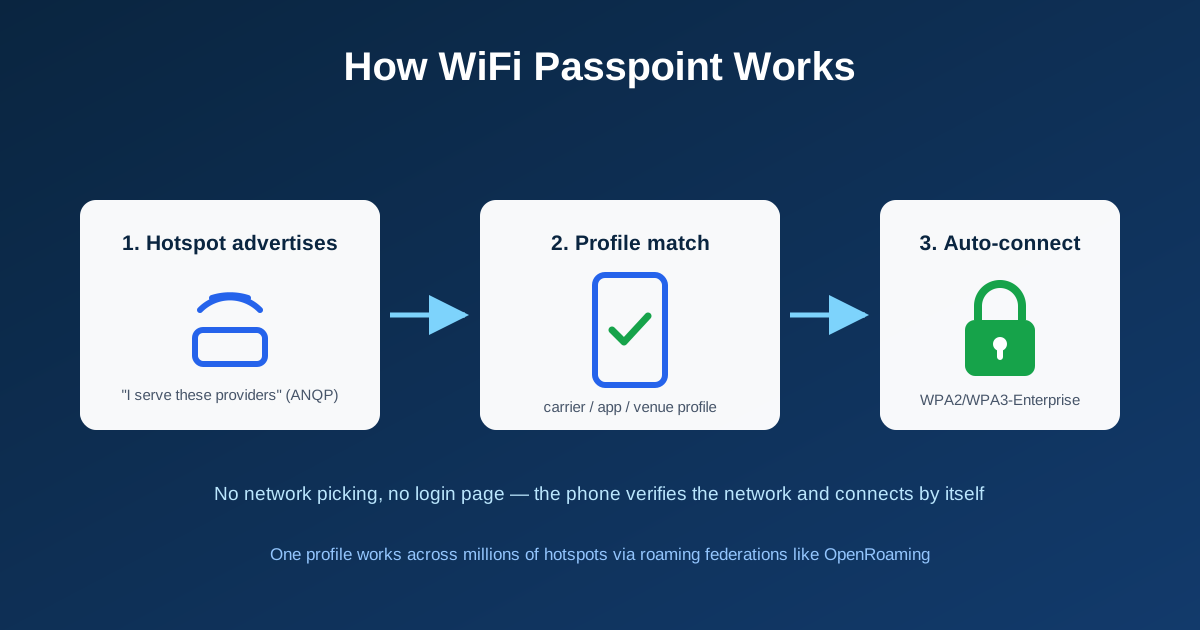
How Passpoint Works
Passpoint is built on IEEE 802.11u. The pieces fit together like this:
- The hotspot advertises itself: Passpoint-enabled access points broadcast extra information (via a mechanism called ANQP) describing which service providers and roaming partners the network serves
- Your phone checks its profiles: the device quietly compares that list against Passpoint profiles it already holds - installed by your mobile carrier, a hotspot app, a venue, or your company's IT team
- Match found, credentials exchanged: the phone authenticates using WPA2- or WPA3-Enterprise (methods like EAP-TLS certificates or the SIM card itself), and the network's RADIUS server verifies it
- Connected and encrypted: the link comes up with enterprise-grade encryption - unlike ordinary open hotspot WiFi, traffic is not readable by other people on the network
Behind the scenes this is the same machinery enterprises use for office WiFi: a RADIUS server makes the access decision, and roaming federations let one profile work across millions of hotspots run by different operators. The largest of these federations, OpenRoaming, is doing for WiFi what roaming agreements did for cellular - our OpenRoaming guide covers how it works.
Where You See Passpoint in Real Life
- Carrier hotspots. Major mobile carriers preload Passpoint profiles (often authenticating with your SIM) so phones offload onto partner WiFi in busy places
- Airports and stadiums. Large venues are the flagship deployments - your phone connects the moment you walk in
- Cable-provider hotspot networks. Home-internet subscribers get app-installed profiles that unlock the provider's nationwide hotspot footprint
- Campuses and offices. Organizations issue Passpoint profiles so people connect securely across every building and affiliated location
- The Android toggle. Android exposes Passpoint directly (typically under Network & internet > Internet > Network preferences, wording varies by version). iPhones support Passpoint too, but manage it through configuration profiles rather than a visible switch
Is Passpoint Safe? (Short Answer: Safer Than Normal Public WiFi)
Passpoint fixes the two biggest problems with public hotspots. First, encryption: an ordinary open network sends your traffic in the clear, while a Passpoint connection uses the same WPA2/WPA3-Enterprise encryption as a corporate office. Second, network verification: before sending any credentials, your device validates the network's certificate - so a fake "evil twin" hotspot impersonating the real one fails authentication instead of harvesting your login.
The Trade-Off Is Convenience, Not Security
The honest downside of Passpoint is that it is automatic: your phone may join participating hotspots without asking, which routes your traffic through the hotspot operator or carrier partner. That is a preference and privacy question, not an encryption weakness - the connection itself is far more secure than any open network with a login page.
Should You Turn Passpoint Off?
For most people, leaving Passpoint on is the right call: seamless encrypted WiFi in busy places, less mobile data used, and fewer sketchy open networks. Turning it off makes sense if you prefer choosing every network manually, you do not want carrier-partner hotspots in the path of your traffic, or you are debugging a device that keeps joining a network you do not want.
- Android: look for the Passpoint toggle under WiFi or network preferences (path varies by version and manufacturer); you can also remove individual saved Passpoint profiles
- iPhone: check Settings > General > VPN & Device Management for installed profiles, or disable Auto-Join on the specific network; carrier-level offload is controlled by the carrier bundle
- Either platform: deleting the app that installed a hotspot profile usually removes the profile with it
Passpoint vs the WiFi Login Page
The alternative most venues still use is the captive portal - the branded sign-in page you see on hotel and cafe WiFi. Portals are better when the venue wants engagement (email capture, terms acceptance, payments); Passpoint is better when the goal is fast, secure, invisible connectivity for returning visitors. They also coexist: a venue can onboard first-time guests through a portal and hand them a Passpoint profile so every later visit connects automatically. Our Passpoint vs captive portals comparison goes deeper on when each wins.
Offering Passpoint on Your Own Network
If you run a venue, campus, or hotspot network, Passpoint is how you give visitors carrier-grade WiFi: provision profiles once, and phones connect securely on every visit with zero front-desk friction. IronWiFi's hosted Passpoint service handles the profiles, certificates, and RADIUS authentication on the access points you already own, and connects your network to the OpenRoaming federation. For the deeper technical build-out - 802.11u settings, ANQP elements, and vendor specifics - see the Hotspot 2.0 implementation guide.
Give Your Visitors Auto-Connect WiFi
IronWiFi runs Passpoint and OpenRoaming for venues, campuses, and carriers - profile provisioning, certificate management, and RADIUS included, on your existing hardware.
Start Free Trial Explore Passpoint See PricingConclusion
Passpoint is the quiet upgrade public WiFi has needed for a decade: connections that happen by themselves, encrypted by default, with the network proving its identity before your phone says a word. As a user, the setting is usually worth leaving on. As a network operator, it is the difference between WiFi people tolerate and WiFi people never have to think about.

Daniel Konecny
Blog Writer, IronWiFi
Daniel writes about enterprise WiFi authentication and identity security at IronWiFi. With deep expertise in RADIUS, 802.1X, and cloud infrastructure, he covers practical network security for IT teams managing thousands of devices.
About the author